Hardware
Arkidome finds the sound and prepares it for the machine you play it on. For hardware that reads samples from a drive (a USB stick or an SD card), it converts them to the format the device plays (or copies them as they are, for a device that plays any format), brings them to a similar level and writes them where the device looks. Your library is only read: every file stays where it is.
Supported devices
| Device | What it reads | Guide |
|---|---|---|
| ALM Squid Salmple | Banks of eight channels, sets of banks and a Pool of folders, on a FAT32 stick | Squid Salmple |
| Endorphin.es Queen of Pentacles | Eight banks of four numbered files, on a FAT microSD card | Queen of Pentacles |
| Expert Sleepers disting mk4/EX | Up to 100 folders of WAV files at the top of a FAT32 microSD card | disting mk4/EX |
| Expert Sleepers disting NT | Folders of WAV files inside samples on a FAT32 or exFAT microSD card |
disting NT |
| Erica Synths Sample Drum | Folders of mono 48 kHz samples inside SAMPLES, on a FAT32 microSD card |
Sample Drum |
| Qu-Bit Electronix Nebulae | Audio files lying loose in the root of a FAT32 stick, in any format, up to 75 MB | Nebulae |
| Make Noise Morphagene | Up to 32 reels as stereo 32-bit float files in the top of a FAT32 microSD card | Morphagene |
| Orthogonal Devices ER-301 | Folders of WAV files inside ER-301/samples on a FAT32 or exFAT microSD card, copied as they are |
ER-301 |
| Elektron Octatrack | Sets as folders at the top of a FAT Compact Flash card, each with its own AUDIO pool of WAV files |
Octatrack |
| Instruō arbhar | The 36 fixed library locations in _arbhar_library on a USB stick |
arbhar |
| Music Thing Modular Radio Music | Numbered bank folders 00 to 15 of named files on a microSD card |
Radio Music |
| Squarp Instruments Rample | Kit folders A0 to Z99, four voices each, on a microSD card |
Rample |
More devices are coming. Each one gets a page of its own under this one, with its limits and what is special about it. Arkidome is not made by or affiliated with the makers of any device named here.
What every device gets
There is nothing to switch on. Plug in a drive that belongs to a device and its features appear, and they go away when you unplug it.
- It is recognized by its folders. A device's drive holds a folder the device itself makes (the Squid's is
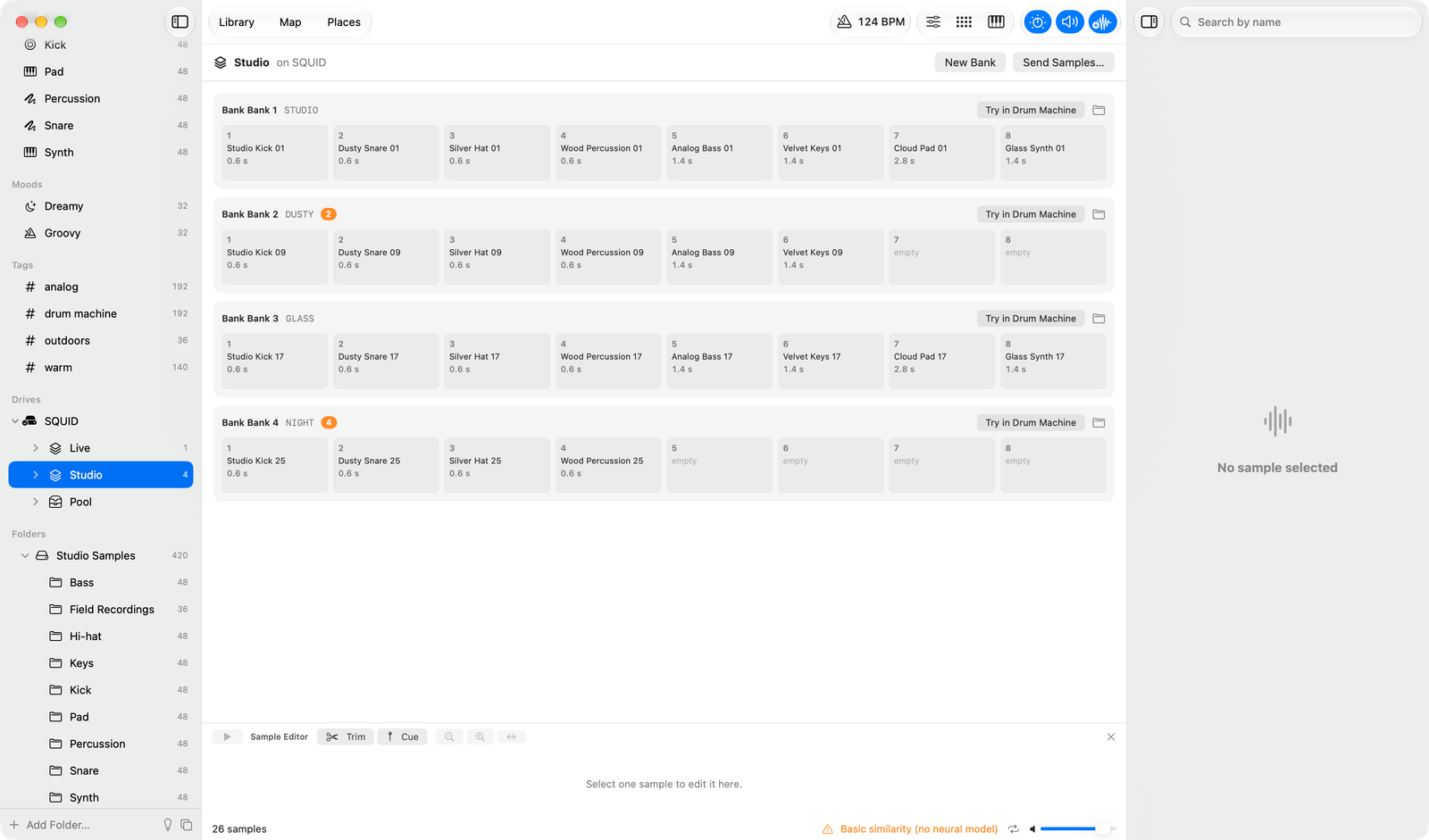
ALM022). Arkidome reads that folder, not the drive's name, so any stick the device formatted is found. A device whose card has no such folder, like the Queen of Pentacles, is recognized by how the card is laid out instead. The Expert Sleepers disting mk4/EX is set up from the sidebar first, with Set Up for Device, which adds aplaylist.txt. - It has its own sidebar rows. The drive shows under Drives with whatever the device organizes samples into: banks, sets, a pool of folders. Hear a sample, drag it out or try it in the drum machine, as with your own sounds. Samples on a drive are never added to your library.
- It has its own Send to… entry. The device's name is in the right-click menu for samples and collections, the File menu and the drum machine, while the drive is connected.
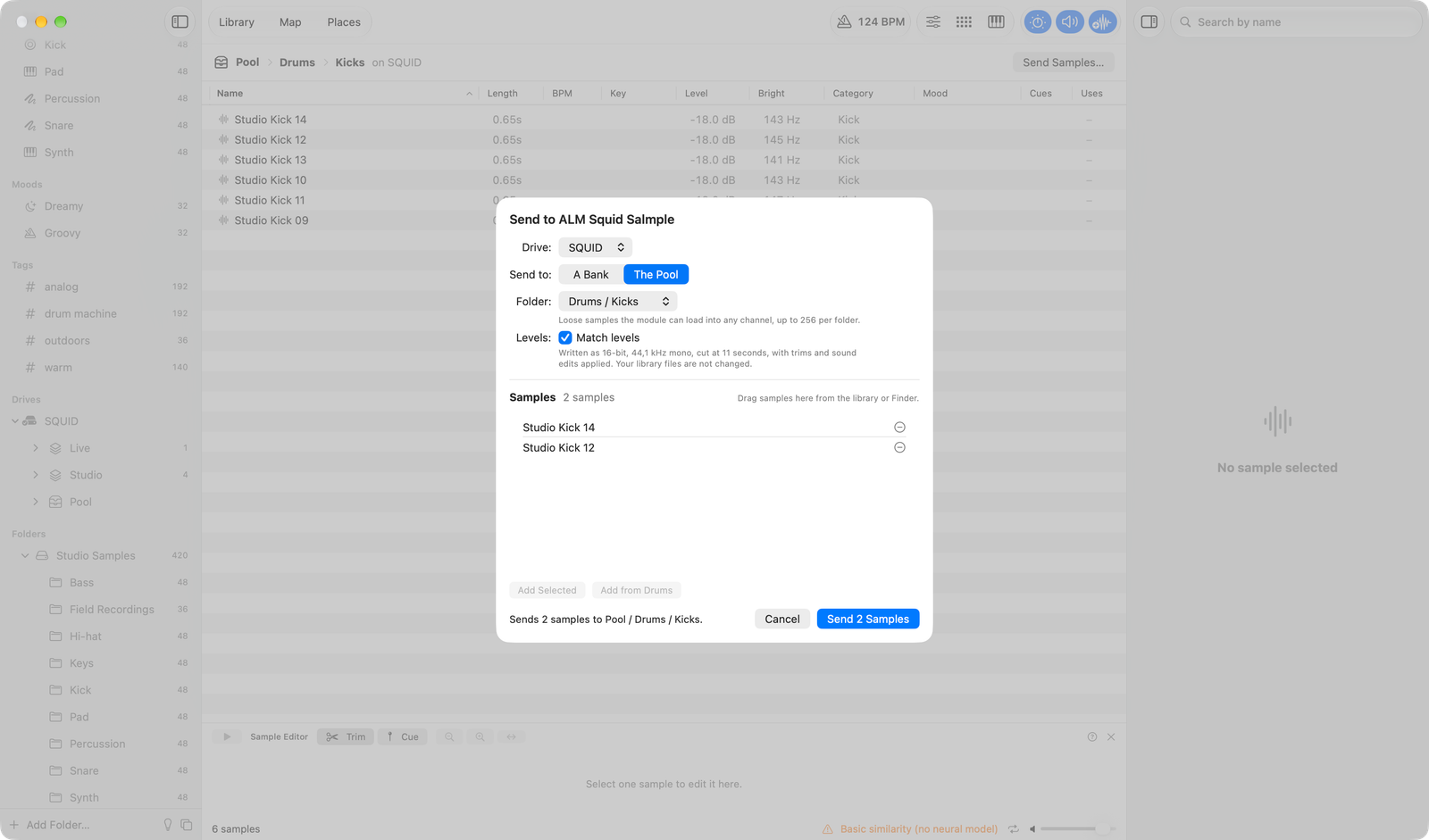
- It has its own send sheet. The sheet shows where each sample will go, with the device's limits: how many samples fit, how long a name may be, which channels are free. A sentence beside Send says what it will write, or why it cannot yet.
What a send does
- Converts the samples to the device's format, such as 16-bit 44.1 kHz mono, and cuts them at the longest sample it plays. Trims and sound edits are applied, as everywhere else in the app.
- Matches levels, so samples play at similar volumes. The sheet's Match levels switch turns it off.
- Keeps names as you type them. An orange note says when the device may show one cut.
- Never overwrites silently. A channel that already holds a sample shows in orange or red. An old sample is only replaced once the new file is written and checked, and if anything fails the old ones are put back.
- Joins samples for devices that read cue points, so a whole set of sounds can travel in one file. A device that ignores cue points never offers this.
Writing to a device
Arkidome writes only to a connected device's own drive, and only when you send, rename, move, trash or normalize something there. Other USB drives are never written to, and the files in your library are only read.
Your own device
A device is described by one short description: how its drive is recognized, how samples are laid out on it, the format
it plays and whether it reads cue points. Settings > Devices lists the devices the app knows, Save
Example writes a description to start from, and Reload reads the folder again. Descriptions are checked before they
are used, and one that cannot be used is listed with the reason. A description can use five layouts: numbered
banks of channel folders (optionally in sets), banks of numbered files, banks of named files inside numbered or
lettered folders, a pool of folders, and set folders each with its own pool (the Octatrack's <Set>/AUDIO).
Devices that need MIDI, SysEx or the maker's own transfer app are not covered.
If your device is not here, ask for it and say which one it is.